Radar Alive Pro Weather Radar
- 4.3
- Rating
- 10.00K
- Installs
- $7.99
- Price
 Analysis by App-foxy
Weather apps usually win me over quickly and lose me just as quickly. A bright map can feel impressive during the first storm, but the real test is whether I still open it a month later, when the novelty has gone and I simply need a dependable view of what is moving toward me. Radar Alive Pro Weather Radar is aimed at that more serious habit. It is a paid weather app from Tiny Vital Systems, LLC, built around radar rather than a broad collection of lifestyle-weather extras.
My first impression is that this is not trying to be a cheerful forecast companion. Its identity is much closer to a monitoring tool for people who want to watch precipitation develop, approach, and pass. That focus makes it appealing when conditions are changing quickly, especially if a normal forecast feels too general. It also creates a clear question: will a dedicated radar app earn regular space on your phone when the sky is calm?
At $7.99, the decision is more deliberate than installing a free weather app and forgetting about it. The app is rated for Everyone, runs on Android 6.0 or later, and has reached over ten thousand installs. Its average rating is 4.3 from around 500 ratings, with more than 300 written reviews. Those figures suggest a committed niche rather than mass-market dominance, which fits the product’s more specialized character.
You May Also Like

 Pandora - Music & Podcasts
Pandora’s Music Is Easy to Start, but Harder to Recover
Pandora’s strength is its low-effort path from a seed to a station. Its weak spot is how much confidence it asks you to place in connection, setup, and quiet recovery.

 8 Ball Pool
 Is Built on Rivalries, Rematches, and Routine
A close look at the rivalries, rematches, shared routines, and unanswered safety questions that turn a quick pool match into a persistent mobile community.

 Samsung Music
’s Quiet Strength Is Playing What You Already Own
Its reach comes less from spectacle than from dependable access to a personal library. That simplicity is both the app’s strongest retention engine and its ceiling.

 AccuWeather: Weather Radar
AccuWeather Review: A Quick, Clear Forecast for Everyday Decisions
For everyday plans, the best forecast is the one you can understand quickly. AccuWeather makes rain timing, radar, and local conditions easy to act on, with a few trade-offs.

 Hill Climb Racing
Why Hill Climb Racing Still Turns Crashes Into One More Run
A tiny car, a bumpy hill and one more upgrade: Hill Climb Racing keeps resurfacing because its simple chaos makes every near-miss feel personal.

 AliExpress - Shopping App
AliExpress Makes Global Shopping Feel Personal, but Shoppers Bear the Risk
AliExpress turns a global marketplace into a pocket-sized discovery engine. Its reach is useful, its shopping loop compelling, and its trade-offs easy to miss.
More From Our News Desk
View All News


From an impressive first week to a useful weather habit
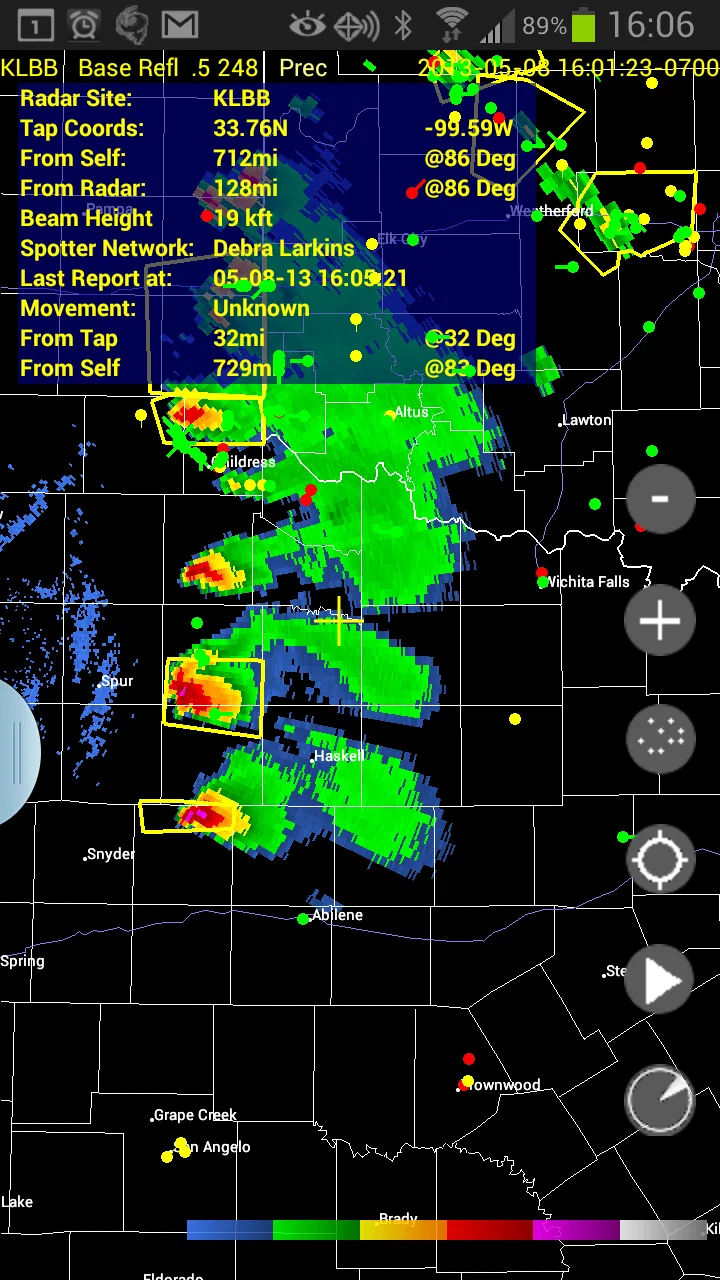
During the first week, the strongest appeal is the feeling of having more control over a changing situation. Instead of waiting for a forecast sentence to tell me that rain is likely, I can approach the question visually: where is the precipitation now, which direction is it moving, and does its path matter to my plans? That change in viewpoint is the reason to choose a radar-focused app in the first place.
I find this especially useful before leaving for an outdoor appointment, a walk, a drive, or a sports activity. A general weather app may show an hourly rain probability, but that number does not always answer the practical question of timing. A radar view can help me decide whether to leave immediately, wait a little, or carry on because the approaching area is unlikely to affect my route soon.
The app’s storm-chasing identity also gives it a different emotional tone from ordinary forecast tools. It feels designed for users who would rather inspect the weather than receive a simplified conclusion. That can be satisfying if you enjoy following a storm system or checking how a line of rain is evolving. It is less satisfying if you only want a quick temperature glance before getting dressed.
One useful habit is to check the radar before making a decision, not after the weather has already changed. I would open it before walking to public transport, before starting a long drive, or before setting up anything outdoors. The value comes from using the visual information to adjust a plan, rather than treating the application as a dramatic screen to watch for entertainment.
There is also a practical learning curve. People who are already familiar with radar imagery will probably understand the purpose quickly. New users may need time to become comfortable interpreting movement, gaps, intensity, and the difference between a colorful display and a genuinely useful conclusion. The app can support better judgment, but it does not remove the need for judgment.
My first-week advice is simple: test it against decisions you actually make. Do not judge it only by how impressive the map looks. Check whether it helps you choose when to leave, whether it reduces unnecessary weather checks, and whether you can understand what you are seeing without constantly switching to another app. If it becomes part of a repeatable routine, the purchase starts to make more sense.
Why a dedicated radar view can beat the usual forecast app
Most everyday weather apps are built around convenience. They put the current condition, a short forecast, and perhaps an hourly timeline in front of you. That is ideal when your question is, “What should I wear?” Radar Alive Pro Weather Radar approaches a different question: “What is happening in the surrounding weather, and how might it affect my next decision?”
That distinction matters during unsettled days. A forecast may say rain is expected sometime in the afternoon, while a radar view can make the timing feel more concrete. It does not guarantee perfect local prediction, but it gives me a way to inspect the situation instead of accepting one summary line. For a storm watcher, commuter, outdoor worker, or event organizer, that extra context may be worth paying for.
The trade-off is speed. A conventional app is usually easier for a one-second check. Radar requires attention, interpretation, and a willingness to look at a moving weather picture. I would not replace a simple daily forecast app with this unless I regularly need situational awareness. For many people, the ordinary free option remains the better tool because it answers their needs with less effort.
What remains valuable after the novelty fades
The month-to-month question is more demanding. Storm tracking is naturally interesting during dramatic weather, but most days are not dramatic. A specialized radar tool earns lasting space only when it remains useful during ordinary uncertainty: a cloudy morning, a scattered shower, a commute with several stops, or an outdoor plan that cannot be moved easily.
For me, the recurring value comes from using it as a decision checkpoint. I would not open it constantly throughout the day. Instead, I would check it at meaningful moments: before leaving home, before beginning an outdoor task, and when the weather starts to change unexpectedly. That limited rhythm is important because it keeps the app useful without turning it into a nervous habit.
A good long-term workflow is to pair radar inspection with a clear question. “Is rain approaching my route?” is better than staring at the display without a purpose. “Should I postpone this activity?” is better than repeatedly refreshing because the colors are interesting. This approach turns a specialized app into a practical instrument and prevents it from becoming another source of screen fatigue.
It is also worth remembering that radar is most valuable when conditions are active or uncertain. On a stable, clear day, a full radar check may add nothing. That does not necessarily make the app weak; it means its usefulness is conditional. A hammer is not judged by how often it is needed, but you should still decide whether your life contains enough nails to justify carrying one.
People who spend time outdoors may find the recurring value easier to recognize. A gardener can use it before starting a task that is difficult to interrupt. Someone responsible for a small outdoor gathering can check the broader movement rather than relying only on a generic rain icon. A driver who regularly crosses exposed areas may appreciate seeing whether precipitation is isolated or part of a larger pattern.
There is a less obvious benefit in developing visual weather literacy. After repeated use, I become better at asking sensible questions about movement and timing instead of treating every forecast as a fixed promise. That is not a flashy feature, but it is one of the more durable reasons to keep a radar app installed. The tool becomes more useful as I learn how to use it.
A realistic everyday scenario
Imagine I have planned a late-afternoon walk and need to pick up groceries afterward. The standard weather app says showers are possible, which is too vague to guide the decision. I open Radar Alive before leaving, inspect the current pattern, and decide whether the walk is likely to be interrupted or whether I should reverse the order and shop first. If the weather is moving in quickly, I can shorten the walk or take an umbrella; if the activity is clear for a while, I can leave with more confidence.
The important point is not that the app predicts my exact street perfectly. The useful part is that it helps me make a better-informed choice with the information available. I still need common sense, especially when weather is developing rapidly. Radar is a planning aid, not a substitute for caution.
That same workflow applies to outdoor work, cycling, photography, school pickup, and travel between appointments. The app earns its place when it prevents a small inconvenience from becoming a larger one. It is less compelling when my plans are flexible or when I already have no reason to care about short-term precipitation movement.
The maintenance burden of keeping a specialist app useful
Every weather app creates a small maintenance burden, even when that burden is not obvious. I need to remember which app is best for which question, keep my expectations realistic, and avoid opening several tools that all provide slightly different answers. With Radar Alive, the main maintenance task is mental: I have to keep using it for the kind of information it is designed to provide rather than expecting it to behave like a complete general forecast service.
Its age is worth considering in a practical way. The app was released in April 2011 and is now at version 60.0.0.18, while supporting Android 6.0 and later. That long history can be reassuring for users who prefer an established product, but it also means compatibility and presentation may matter more to you than the app’s basic concept. Anyone using a newer phone should pay attention to how comfortably the interface fits their device and habits.
I would also avoid making it the only source for high-consequence decisions. If severe weather could affect travel, work, or safety, I would cross-check with official alerts and local information. A radar display is valuable context, but it is not the same thing as an emergency warning system. This is one of the most important maintenance habits: know when the app is appropriate and when another source must take priority.
The paid price changes how I evaluate updates and long-term usefulness. At $7.99, I am not looking for a disposable novelty. I want a tool that remains convenient enough to open and clear enough to interpret. The purchase is easier to justify for someone who repeatedly needs radar context, while a casual user may feel that a free weather app already covers the occasional question.
There is no reason to keep it installed merely because it once helped during a memorable storm. A better test is whether it still solves a recurring problem. If I have not used radar in several weeks because my plans are simple and the weather is stable, I may not need a dedicated tool. If I keep returning whenever conditions become uncertain, its specialized role is doing real work.
Where fatigue and friction can appear
The biggest source of fatigue is the amount of interpretation expected from the user. A radar map can look authoritative, but colors and movement do not automatically translate into a precise answer about one location. New users may feel that the app is more complicated than a standard forecast, while experienced users may still become tired of checking a detailed display for small decisions.
Another friction point is focus. A dedicated radar product may feel narrow if I want a complete daily weather dashboard with many kinds of information in one place. If my routine includes checking temperature, wind, forecasts, and other conditions together, I may prefer a broader weather app and use radar only when necessary. Radar Alive is strongest when radar itself is the main reason I am opening the app.
The visual approach can also encourage overchecking. When weather is unsettled, it is tempting to watch every change and repeatedly revise plans. I find a better rule is to check at decision points and then act. If I keep refreshing without changing what I will do, the app has stopped helping. This is a user habit rather than a technical flaw, but it affects whether the product feels calm and useful over time.
Price is another possible barrier. Free weather apps are good enough for many people, and a paid specialist tool must earn its cost through repeated use. I would skip this purchase if I only want a morning temperature, a simple forecast, or an occasional rain reminder. I would also hesitate if I dislike interpreting maps or prefer a single plain-language answer.
On the other hand, I would not dismiss it simply because it is specialized. The narrow focus is exactly why it can be more satisfying than a crowded weather application. If I regularly make outdoor plans, monitor storms, or need a closer look at changing precipitation, the lack of distraction becomes a strength rather than a weakness.
Who should install it, and who should pass?
I recommend it to weather enthusiasts, storm watchers, outdoor professionals, commuters with inflexible routes, and anyone who has repeatedly wished for more context than a rain percentage provides. It is also a reasonable choice for people who enjoy learning how to read weather movement and are willing to spend a little time building that skill.
I would steer casual users toward a simpler alternative if their needs stop at current conditions and a short forecast. Families looking for a broad household weather dashboard may also prefer an app that combines more information in one place. Likewise, anyone making safety-critical decisions should treat this as one view among several, not as the sole authority.
Before paying, I would ask myself three questions. Do I often need to decide whether to delay an outdoor plan? Do I prefer inspecting a map to reading a summarized forecast? Will I open a specialized tool during ordinary uncertain days, not just during spectacular storms? If the answer to all three is yes, the price is easier to defend.
My long-term verdict on Radar Alive Pro Weather Radar
After the first-week excitement, this app succeeds or fails based on discipline. It is not a weather app I would open automatically for every small detail. It is a focused radar instrument that becomes valuable when I have a concrete planning question and need more visual context than a standard forecast offers.
The long-term strength is its specialization. Rather than trying to be everything, it gives serious weather users a reason to look closer. That makes it more useful than a generic app in the situations where precipitation movement matters. The long-term weakness is the same specialization: on quiet days, or for people who want effortless summaries, it can feel unnecessary.
I appreciate that the product has been around for years and continues under Tiny Vital Systems, LLC, but longevity alone is not a reason to buy it. The lasting value comes from fitting it into a sensible routine: check before important outdoor decisions, interpret what you see carefully, and cross-check official information when conditions could become dangerous.
My recommendation is conditional but positive: pay for it if radar is a recurring need, not if it is merely an occasional curiosity. I would keep it installed for outdoor planning and storm monitoring, while retaining a simpler forecast source for quick daily checks. Used that way, Radar Alive Pro Weather Radar earns lasting space because it answers a specific question well enough to change what I do, rather than because it is merely interesting to watch.
FAQs for Radar Alive Pro Weather Radar
01What is Radar Alive Pro Weather Radar?
Radar Alive Pro Weather Radar is a weather-monitoring app designed to provide live radar imagery, current conditions, forecasts, and severe-weather information in one place. During testing, its main value was the ability to view approaching rain and storm activity on an interactive map instead of relying only on a basic daily forecast. It is particularly useful for checking weather changes before commuting, traveling, exercising outdoors, or planning activities.
02Does Radar Alive Pro Weather Radar provide real-time weather radar data?
The app is built around near-real-time radar and weather updates, but users should understand that radar information is not always perfectly instantaneous. Data availability, update frequency, and coverage can vary by country, region, internet connection, and the weather-data providers used by the service. Radar Alive Pro is most useful for tracking precipitation trends and storm movement, while official emergency alerts should remain the primary source during dangerous weather.
03What features are included in the Pro version?
The Pro edition generally focuses on expanding the core weather experience with additional radar views, fewer or no advertisements, more detailed weather information, and extra customization or alert options, depending on the current version and subscription terms. Before downloading or upgrading, it is worth checking the app-store listing for the exact features included in your region, because developers may change packages, pricing, or premium benefits over time.
04Does Radar Alive Pro Weather Radar require location access?
Location permission is helpful but not always essential. Allowing access lets the app automatically center the map on your current position and provide more relevant local conditions, radar activity, and alerts. You can usually search for another city or manually choose a location if you prefer not to share your position. For privacy-conscious users, reviewing the permission settings and the developer’s privacy policy before enabling background location access is recommended.
05Is Radar Alive Pro Weather Radar free to download and use?
Availability and pricing can depend on the platform, country, and current store listing. The app may offer free access to basic weather information while reserving advanced tools, an ad-free experience, or enhanced radar features for Pro users. In-app purchases or subscriptions may renew automatically unless canceled through Google Play or the App Store. Always review the price, trial period, renewal conditions, and cancellation instructions before confirming a purchase.
Pros
- Highly detailed radar imagery helps track rain
- snow
- and storms in real time.
- Animated radar layers make approaching weather systems easy to follow visually.
- Useful alerts can help users prepare for severe weather conditions.
- Supports multiple map views for comparing radar and weather information.
- Pro features provide a more complete experience for frequent weather watchers.
Cons
- Advanced radar data may consume considerable mobile data during extended use.
- Some features can be difficult to understand without prior weather knowledge.
- Radar coverage and accuracy may vary depending on the user’s location.
- The interface can feel busy when several weather layers are enabled.
- A subscription or purchase may be required for the most useful tools.

Radar Alive Pro Weather Radar
Gallery